-
[Android] Call Back 함수공부Android📱 2022. 3. 6. 20:46
콜백 함수 구현해보기
바로 기
call back 함수는?
함수를 인자로 보내서 그 안에 있는 함수를 이용하는 것이다.
정말;;; 머리가 좋은 사람이 많은 거 같다.
이해해보면 많은 문제를 해결해볼수있다.Listener
interface Listener {

    interface LoadCallBack {

        fun onTextLoaded()

        fun onChangeText()
    }

fun getText(str: String, callback: LoadCallBack)

}
리스너를 인터페이스로 구현한다.
리스너를 통해서 콜백을 주고 받을 것이다.😤Contractor
interface Contractor {

    interface View {
        fun setTextOne(str: String)

    }

    interface Presenter {
        fun setData(str: String)

        fun onChangeViewText(str: String)
    }
}
그냥 MVP 흉내내 보려고 만들었다.
귀찮으신 분들은 딱히 없어도 된다. (물론 그냥 실험할 때... 실제로 만들 때는 꼭 해야 합니다...)MainActivity
import androidx.appcompat.app.AppCompatActivity
import android.os.Bundle
import android.widget.Button
import android.widget.TextView
import android.widget.Toast

class MainActivity : AppCompatActivity(), Contractor.View {
    private val msg = "콜백!!"
    override fun onCreate(savedInstanceState: Bundle?) {
        super.onCreate(savedInstanceState)
        setContentView(R.layout.activity_main)
        val presenter = Presenter(this)
        val button: Button = findViewById(R.id.click)
        button.setOnClickListener {
            presenter.getText("안녕하세요", object : Listener.LoadCallBack{
                override fun onTextLoaded() {
                    successMessage()
                }

                override fun onChangeText() {
                    setTextTwo()
                }
            })
        }

    }

    override fun setTextOne(str: String) {
        val textOne = findViewById<TextView>(R.id.text1)
        textOne.text = str
    }

    private fun setTextTwo() {
        val textTwo = findViewById<TextView>(R.id.text2)
        textTwo.text = msg
    }

    private fun successMessage() {
        Toast.makeText(this, "변경 완료", Toast.LENGTH_SHORT).show()
    }
}
여기가 콜백을 실험해볼 중요 포인트다
main_activity.xml
<?xml version="1.0" encoding="utf-8"?>
<androidx.constraintlayout.widget.ConstraintLayout xmlns:android="http://schemas.android.com/apk/res/android"
    xmlns:app="http://schemas.android.com/apk/res-auto"
    xmlns:tools="http://schemas.android.com/tools"
    android:layout_width="match_parent"
    android:layout_height="match_parent"
    tools:context=".MainActivity">

    <TextView
        android:id="@+id/text1"
        android:layout_width="wrap_content"
        android:layout_height="wrap_content"
        android:text="Hello World!"
        app:layout_constraintBottom_toBottomOf="parent"
        app:layout_constraintLeft_toLeftOf="parent"
        app:layout_constraintRight_toRightOf="parent"
        app:layout_constraintTop_toTopOf="parent" />

    <TextView
        android:id="@+id/text2"
        android:layout_width="wrap_content"
        android:layout_height="wrap_content"
        app:layout_constraintBottom_toTopOf="@+id/text1"
        app:layout_constraintStart_toStartOf="parent"
        app:layout_constraintEnd_toEndOf="parent"
        android:text="text2"/>
    <Button
        android:id="@+id/click"
        android:layout_width="wrap_content"
        android:layout_height="wrap_content"
        app:layout_constraintStart_toStartOf="parent"
        app:layout_constraintEnd_toEndOf="parent"
        app:layout_constraintTop_toBottomOf="@+id/text1"
        android:text="누르기"/>
</androidx.constraintlayout.widget.ConstraintLayout>
메인 액티비티에 버튼과 텍스트 뷰를 추가해서 텍스트 1은 프레젼 터에서 변경할 거고
텍스트 2는 액티비티에서 보내준 콜백 함수로 변경할 거다. 덤으로 토스트 메시지도 출력!
setTextTwo()와 successMessage()는 private이라 presenter에서는 사용이 불가능하다.
하지만 콜백을 쓰면 조정이 가능해진다.
이걸 이해하면 많은 곳에 사용할 수 있을 거 같다는 생각을 하였다.
보통은 데이터 변경을 신청하고 알리고 하는 부분에서 많이 쓰는 거 같아서 프레젠터를 이용해서 구현해보았다.Data
data class Data(private var str : String = "Hello") {
    fun setStr(_str: String) {
        str = _str
    }

    fun getStr() = str
}
텍스트 1에서 사용할 데이터도 저장을 해보자
Presenter
class Presenter(private val view: Contractor.View) : Contractor.Presenter, Listener {
    private var data = Data()

    override fun getText(str: String, callback: Listener.LoadCallBack) {
        setData(str)
        onChangeViewText(str)
        callback.onTextLoaded()
        callback.onChangeText()
    }

    override fun setData(str: String) {
        data.setStr(str)
    }

    override fun onChangeViewText(str: String) {
        view.setTextOne(data.getStr())
    }

}
이 모든 걸 을 사용할 presenter
``kotlin
button.setOnClickListener {
presenter.getText("안녕하세요", object : Listener.LoadCallBack{
override fun onTextLoaded() {
successMessage()
}override fun onChangeText() { setTextTwo() } }) }여기 클릭 리스너에 보면 인자로 object : Listener.LoadCallBack 익명 함수를 보내고 있다. ```kotlin override fun onTextLoaded() { successMessage() } override fun onChangeText() { setTextTwo() }이 친구들이 인자로 전달되는 것이다.
그러면override fun getText(str: String, callback: Listener.LoadCallBack) { setData(str) onChangeViewText(str) callback.onTextLoaded() callback.onChangeText() }presenter에서 이처럼 view에서 무언가를 할 수 있게 된다.
대박인 듯....결과
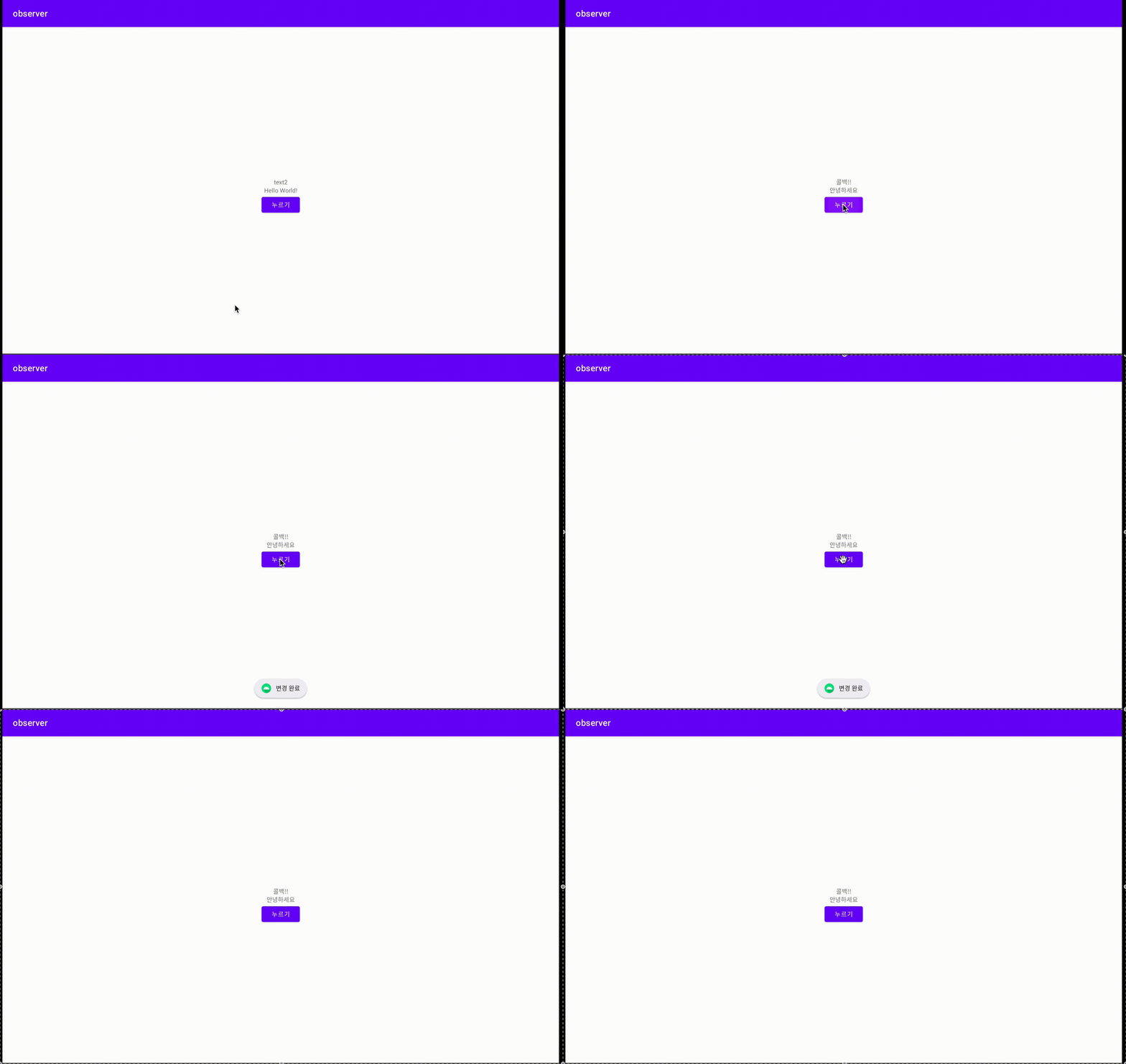
콜백을 안 썼다면 변경이 없었을 텍스트 2와 토스트 메시지가 출력된다.
잘 생각해보면 여기저기서 쓸 수 있겠다.
근데 더 좋은 기술이 많을 수도...소스코드
'Android📱' 카테고리의 다른 글
[안드로이드 오류] Cannot resolve symbol (0) 2022.03.12 [Adroid] Live Data 실험해보기 (0) 2022.03.09 Android 이벤트 리스너의 기원.....과연 어디까지 가는것인가 (0) 2022.03.05 [kotlin] interface Listener로 event listener 구현해보기 (0) 2022.03.04 안드로이드 View의 생명주기 (0) 2022.03.03